Getting Real Creel Data into tidycreel
Using tidycreel.connect to bring files, databases, and APIs into the analysis workflow

The examples in this series have usually begin with tables that are already in R. Real creel data often have another step before that. Interviews might arrive in a CSV export, counts might live in a database, and fish measurements might come from a separate table. Complicating things further, each source has its own names and codes.

That is the part of the workflow handled by tidycreel.connect, which now has its own repository. It provides a foundation that reads source tables and maps them to the names and values that tidycreel expects. The survey design and estimation can then follow from there.
The practical question is simple: Can we describe an export once and reuse that description every time we load it? In this post, we’ll use a small CSV example to explore what that description should include and what still requires our attention each time new data arrive.
Describing the Data Source and Survey Design
The linked-tables post asked what one row represents. That distinction remains important when importing data. A single trip may include catches of multiple species but still represents one interview, while multiple counts conducted on the same date represent separate observations.
A connection profile describes the source: where its tables are, which columns contain the needed information, and what its codes mean. The survey design describes how observations were sampled: the calendar, strata, selection probabilities, and field protocol. We need both.
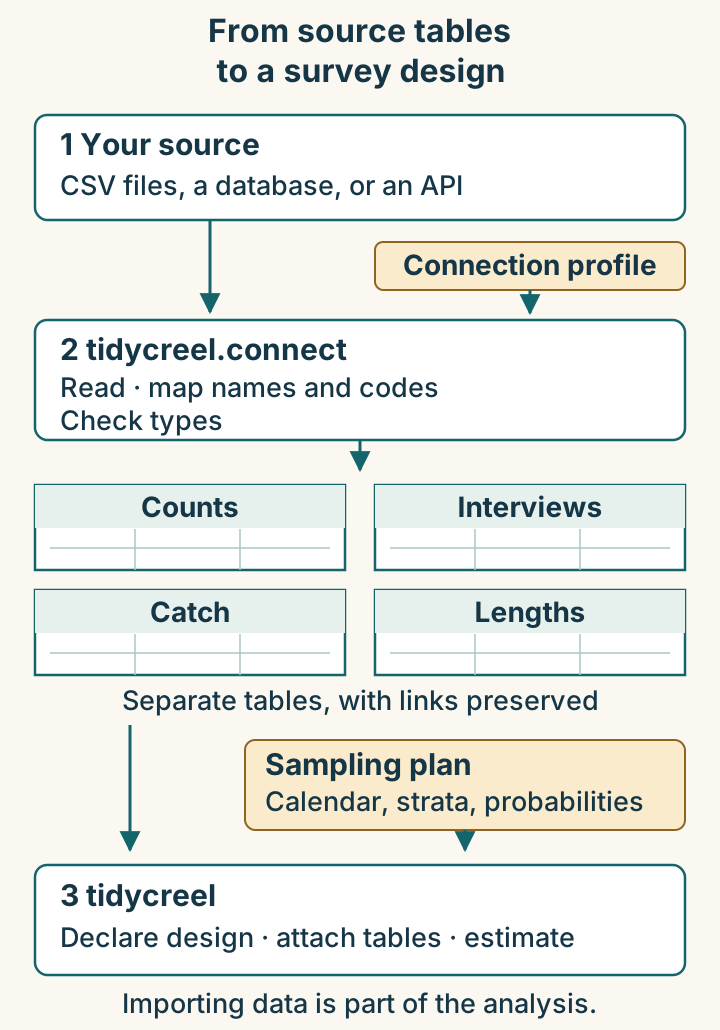
For example, a profile can tell us that HoursFished is the source’s effort column. We still need to know whether those hours describe one angler or a party. Renaming the column cannot answer that question.
Start with a small export we can inspect
The complete R script creates five fictional CSV files and a connection profile, loads the files, checks the results, and attaches the tables to a design. Download it and run it in an R session. It creates a new temporary directory each time and prints its location; the files remain available during that session. No database account is needed.
Install from GitHub
tidycreel.connect is currently available only on GitHub. I have no plans to submit it to CRAN at this time. This example also uses the development version of tidycreel. Install both packages from GitHub with pak:
# Install pak once, if needed.
install.packages("pak")

# Install both GitHub packages and config for this example.
pak::pak(c(
  "chrischizinski/tidycreel",
  "chrischizinski/tidycreel.connect",
  "config"
))
Then run the downloaded example:
# Run after saving the download in your working directory.
source("tidycreel_connect_walkthrough.R")
The config package is needed for the YAML profile used here. The walkthrough was checked with tidycreel 8.0.0.9000 at commit cd02a018 and tidycreel.connect 0.5.0 at b592b8a. These are GitHub builds; the script includes installation commands for those exact revisions. The code below walks through the objects created by the script.
Our fictional fishery permits shore fishing only. The survey has eight completed-trip interviews and two instantaneous counts on each of four sampled dates. All parties were interviewed at the access point after fishing, and everyone in a party fished for the reported trip duration.
The first three interviews arrive like this:
| TripID | HoursFished | PartySize | TotalFish | TripCode |
|---|---|---|---|---|
| trip-01 | 2 | 2 | 3 | C |
| trip-02 | 3 | 1 | 0 | C |
| trip-03 | 1 | 1 | 2 | C |
For trip-01, two anglers fished for two hours each and caught three fish between them. For trip-02, one angler fished for three hours and caught nothing. Both interviews belong in the analysis.
Map the names and explain the codes
The script writes a YAML file, creel-config.yml. YAML is a text format that allows us to define the data source separately from the analysis code. The files section specifies the paths to the five CSV files, while the schema section identifies the relevant columns and codes. Although the script generates this file, it can also be created or edited outside of R using any text editor. This makes it possible to share a common configuration among users working with the same data sources, without requiring each person to define the connections independently.
Here is the interview portion of that profile; the download contains the complete profile for all five files:
schema:
  survey_type: instantaneous
  columns:
    interview_uid: TripID
    date: SurveyDate
    effort: HoursFished
    n_anglers: PartySize
    catch: TotalFish
    trip_status: TripCode
  strata_cols:
    day_type: DayType
  value_maps:
    trip_status:
      "C": complete
Read each column entry as the name the package expects: the name in our export. The value_maps entry does a different job: it says that our source uses C for a completed trip. That meaning comes from the source documentation. The package cannot infer it from the letter.
The distinction between catch and catch_count is important. In this profile, catch maps to TotalFish, the total catch reported for an interview. The fetched interview table names this column catch_count. In contrast, the profile’s catch_count entry maps to FishCount, the number of fish recorded for each species in the separate catch-detail file. The complete example includes both mappings.
After loading, the same first three interviews look like this:
| interview_uid | effort | n_anglers | catch_count | trip_status |
|---|---|---|---|---|
| trip-01 | 2 | 2 | 3 | complete |
| trip-02 | 3 | 1 | 0 | complete |
| trip-03 | 1 | 1 | 2 | complete |
The observations have not changed. The names and trip-status code now have an explicit translation. Dates are read as dates and numeric fields are coerced and checked. Party size remains available for the later calculation of angler-hours.
Fetch each table without flattening the survey
With the profile written, loading the data takes a connection and the appropriate fetch functions:
library(tidycreel)
library(tidycreel.connect)

conn <- creel_connect_from_yaml(profile_path)

interviews <- fetch_interviews(conn)
counts <- fetch_counts(conn)
catch_data <- fetch_catch(conn)
harvest_lengths <- fetch_harvest_lengths(conn)
release_lengths <- fetch_release_lengths(conn)
Here, profile_path points to the YAML file created by our script. When working with your own data, replace it with the path to your own yaml file.
The tables remain separate. In this example, the row counts before and after fetching are:
| Table | Source rows | Fetched rows | What one row represents |
|---|---|---|---|
| Interviews | 8 | 8 | A completed trip by an angler or party |
| Counts | 8 | 8 | An instantaneous count at a recorded time |
| Catch | 7 | 7 | A species and catch type within an interview |
| Harvest lengths | 2 | 2 | A measured harvested fish |
| Release lengths | 0 | 0 | No measurements collected |
The catch file has seven rows because one interview has two species and two interviews have zero catch. That arrangement is intentional. Joining the catch file onto the interviews and summing repeated trip hours would change what the total represents.
The CSV connection currently requires paths for all five tables. When no release lengths were collected, the example supplies an empty CSV with the appropriate headers. An empty measurements table does not establish how many fish were released; that information belongs in the catch records.
Validate the Imported Data
I want to check a few things while the export and the imported tables are still easy to compare. The script verifies that interview identifiers and count times survived, catch and length records link to known interviews, and the interview totals agree with the catch-detail totals in this example.
checks <- c(
  interview_ids_preserved = identical(
    interviews$interview_uid, raw_interviews$TripID
  ),
  count_times_preserved = identical(
    counts$count_time, raw_counts$CountClock
  ),
  catch_records_linked = all(
    catch_data$interview_uid %in% interviews$interview_uid
  ),
  zero_catch_interviews = sum(interviews$catch_count == 0) == 2L
)

print(checks)
The last check is specific to data we constructed. A real export needs checks based on what its records mean. In particular, an absent catch-detail row cannot establish whether the interview had zero catch or whether its catch information is missing.
| Source meaning | Value after import | What it tells us |
|---|---|---|
| The party caught no fish | 0 |
Observed zero catch |
| Catch was not recorded | NA |
Catch is unknown |
| No matching catch-detail row | No row | Consult the source’s recording rules |
The download also makes a separate demonstration copy with one unknown catch value and verifies that it remains NA after fetching. That copy is kept out of the design. We should resolve unknown values according to the survey records before estimation, without substituting zeros to make a check pass.
Also read messages about columns that were not carried through. An unused administrative field may be harmless; a missing stratum, party size, or count time can change the analysis. The diagnostics post picks up those checks after the tables are attached.
Bring the sampling plan back in
The source files contain observations from four dates. Our fictional survey season contains nine dates. The calendar needs all nine, including days on which no sampling occurred, as discussed in the sampling-calendar post.
The example assumes equal day-selection probabilities within weekday and weekend strata. Each sampled day covers the entire eight-hour fishing period; there is no random selection of one shift from several. We therefore supply eight actual hours and a period-selection probability of one.
counts$period_hours <- 8

design <- creel_design(calendar, date = date, strata = day_type) |>
  add_counts(
    counts,
    count_col = bank_anglers,
    count_time_col = count_time,
    period_length_col = period_hours,
    p_period = 1
  ) |>
  add_interviews(
    interviews,
    catch = catch_count,
    effort = effort,
    trip_status = trip_status,
    trip_duration = effort,
    n_anglers = n_anglers,
    interview_type = "access"
  ) |>
  add_catch(
    catch_data,
    catch_uid = interview_uid,
    interview_uid = interview_uid,
    species = species,
    count = catch_count,
    catch_type = catch_type
  )
Using bank_anglers as the count is appropriate here because the fictional fishery has only shore fishing. A survey that also counts fishing boats needs the boat component represented and converted appropriately. Likewise, the eight-hour period and probability of one describe this example’s protocol; they are not general defaults for a creel survey.
The count_time_col argument tells tidycreel that the two counts on each date are repeated observations within a sampled day. The resulting design reports four daily count observations, while retaining the information for within-day variation. The fetch step returned all eight source counts.
For add_catch(), both linking arguments select the interview identifier in their respective tables. Despite its name, the catch_uid argument here does not select the unique catch-row identifier. The script also attaches the measured fish through their interview links.
We now have a design containing the imported observations and the declared sampling information. The design-object post explains why keeping those together matters. This example stops at that handoff so we can inspect it before asking for estimates.
A separate repository for the connection work
tidycreel.connect now lives in its own repository, with separate documentation and issue tracker. The separation reflects the different responsibilities of the two packages. tidycreel.connect handles the differences among data sources, translating them into a consistent set of tables, while tidycreel uses those tables to define survey designs and calculate estimates. Keeping these functions separate allows data connections to change without affecting the analytical methods and lets users work directly with tidycreel when their data are already in the expected format.
Connecting Different Data Sources
The CSV example illustrates in this post is only one way to bring data into the tidycreel workflow. tidycreel.connect also supports databases through DBI, including SQL Server via ODBC, and REST APIs configured through a profile. For CSV files and databases, the schema defines how source columns map to the expected fields. API profiles instead specify mappings for endpoint fields. Each data source requires its own description, but the resulting tables follow a common structure that can be used throughout the analysis.
Once a connection profile has been established, it can be reused for subsequent exports that follow the same data structure and recording conventions. This reduces the need to repeatedly define column mappings and interpret source-specific codes. However, changes to the data structure or field protocols may require updates to the profile, the survey design, or both.
In the next post, we’ll bring these connection profiles, validation checks, and survey design decisions into a Quarto report alongside the resulting estimates. This will provide a documented path from the original data to the final results.