Rebuilding the Palmer Penguins, one triangle at a time
A weekend experiment in image approximation with R and ggplot2
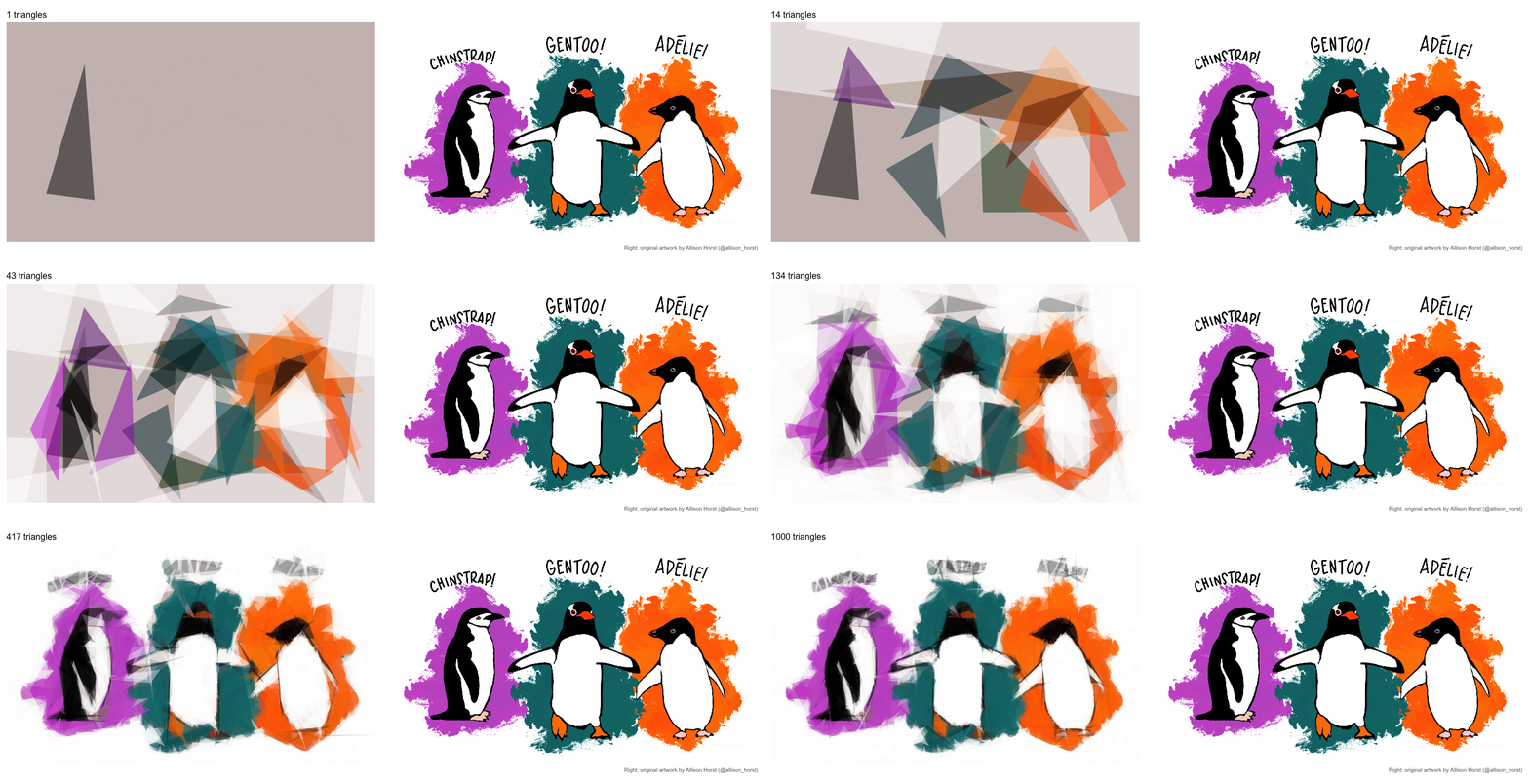
Over the weekend, I saw an Instagram reel from Index Open Source showing a picture rebuilt one simple shape at a time. The tool was Michael Fogleman’s Primitive, written in Go. My first thought was predictable: could I do that in R and draw the result with ggplot2?
I used Allison Horst’s Palmer penguins artwork as the target. It has large blocks of color, recognizable silhouettes, and just enough fine detail to make the approximation struggle. The final image above contains 1,000 translucent triangles. There is no image-recognition model underneath it. The code only asks which triangle will make the current canvas a little more like the target.

The idea behind Primitive
The algorithm is simple enough to describe in five steps:
- Shrink the target image and fill a blank canvas with its average color.
- Generate several random shapes.
- Score each shape by how much it reduces the pixel-level error.
- Nudge the best shape around, keeping mutations that improve the score.
- Paint the winner onto the canvas and repeat.
Once a triangle is added, it stays. The algorithm does not redraw the whole picture after every step. It makes a long series of small, greedy decisions.
I kept the main settings near the top of the script so the experiment is easy to change:
main_seed    <- 2026
n_shapes     <- 1000
shape_type   <- "triangle"
shape_alpha  <- 0.5
work_width   <- 300
n_candidates <- 50
max_age      <- 100
The search runs against an image only 300 pixels wide. That is enough resolution to recover the large forms while keeping the repeated pixel comparisons manageable. The final object is still a table of polygon coordinates, so ggplot2 can draw it at any output size.
Turning an image into something R can score
The source artwork is a PNG with red, green, blue, and alpha channels. I first composite its transparent pixels onto white, then average neighboring pixels into a smaller working image. The result is a matrix with one row per pixel and three columns for color.
Every proposed triangle is converted into the indices of the pixels it covers. For those pixels, the best fill color can be calculated directly. There is no need to guess colors randomly along with the triangle’s position.
evaluate <- function(shape, current, sse) {
  idx <- rasterize(shape_polygon(shape))
  if (length(idx) == 0) return(list(sse = Inf))

  cur <- current[idx, , drop = FALSE]
  tgt <- target[idx, , drop = FALSE]

  col <- pmin(
    pmax(colMeans((tgt - cur) / shape_alpha + cur), 0),
    1
  )

  new <- cur * (1 - shape_alpha) +
    rep(col, each = length(idx)) * shape_alpha

  list(
    shape = shape,
    idx = idx,
    col = col,
    new = new,
    sse = sse - sum((tgt - cur)^2) + sum((tgt - new)^2)
  )
}
The score is the sum of squared differences between the current canvas and the target. Because only the covered pixels change, the function updates the score for those pixels rather than comparing every pixel in the image again.
For each layer, I try 50 random triangles and keep the best starting point. I then hill-climb: move one vertex, keep the move if the error drops, and stop after 100 failed mutations in a row.
best_shape <- function(current, sse) {
  best <- map(
    seq_len(n_candidates),
    \(i) evaluate(random_shape(), current, sse)
  ) |>
    reduce(\(a, b) if (b$sse < a$sse) b else a)

  age <- 0
  while (age < max_age) {
    trial <- evaluate(mutate_shape(best$shape), current, sse)

    if (trial$sse < best$sse) {
      best <- trial
      age <- 0
    } else {
      age <- age + 1
    }
  }

  best
}
This is the same general hill-climbing strategy described by Primitive. My version is deliberately an R experiment, not a line-for-line port of the Go implementation.
Why ggplot2 works well here
After the search, each accepted shape becomes tidy polygon data: an ID, a fill color, and a set of x-y coordinates. Drawing the approximation is then just geom_polygon() with the shapes grouped and painted in their original order.
plot_primitive <- function(data) {
  ggplot(data, aes(x, y, group = id, fill = fill)) +
    geom_polygon(alpha = shape_alpha, colour = NA) +
    scale_fill_identity() +
    coord_fixed(
      xlim = c(0.5, w + 0.5),
      ylim = c(0.5, h + 0.5),
      expand = FALSE
    ) +
    theme_void() +
    theme(
      panel.background = element_rect(
        fill = rgb(bg_start[1], bg_start[2], bg_start[3]),
        colour = NA
      )
    )
}
This is the same reason I keep returning to ggplot2. Once I can get a problem into a data frame, I can usually control how it is drawn. I was following that instinct when I wrote about moving igraph objects into ggplot2 more than a decade ago; here the data frame just happens to contain a thousand triangles.
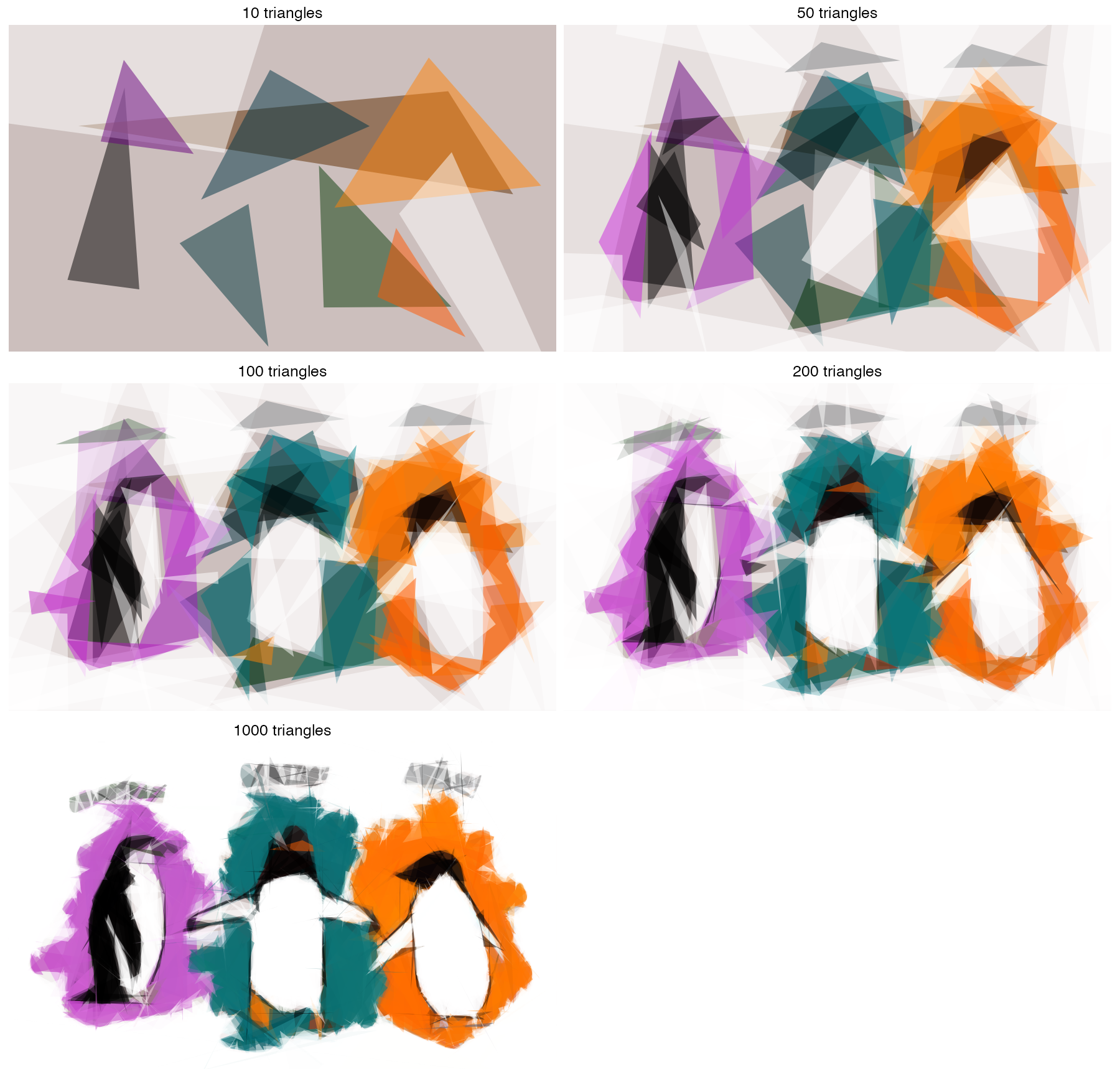
Watching the penguins emerge
The animation uses gganimate::transition_manual(cumulative = TRUE). Frames are spaced geometrically: the first few triangles appear one at a time, while later frames add larger batches. That keeps the early, dramatic decisions visible without making the GIF unbearably long.
frame_steps <- unique(round(n_shapes^seq(0, 1, length.out = 80)))

build_up <- shape_tbl |>
  mutate(
    frame = frame_steps[
      findInterval(id, frame_steps, left.open = TRUE) + 1
    ]
  ) |>
  ggplot(aes(x, y, group = id, fill = fill)) +
  geom_polygon(alpha = shape_alpha, colour = NA) +
  scale_fill_identity() +
  transition_manual(frame, cumulative = TRUE)
The full animation adds the original artwork in a second panel with annotation_raster(), then masks any triangles that extend beyond the reconstructed canvas. It renders 66 frames and pauses on the final comparison.
On my machine, the 1,000-triangle search took about two minutes. Most of the recognizable structure appeared much earlier. The purple, teal, and orange backgrounds arrived first, followed by the white bellies and black heads. The extra shapes refined outlines and contrast, but they never recovered the eyes particularly well. At a working width of 300 pixels, each eye is only a few pixels across, and reducing error in a large background region is usually a better bargain.
That is also my favorite part of the result. The algorithm does not know that an eye matters more to us than a patch of background. It only knows pixel error. The recognizable penguins emerge from that much narrower objective.
Same penguins, different seeds
Every triangle starts as a random proposal, so the seed decides which greedy path the search takes. To see how much that matters, I reran the search with six seeds, stopped each run at 400 triangles, and animated only the finished pictures.
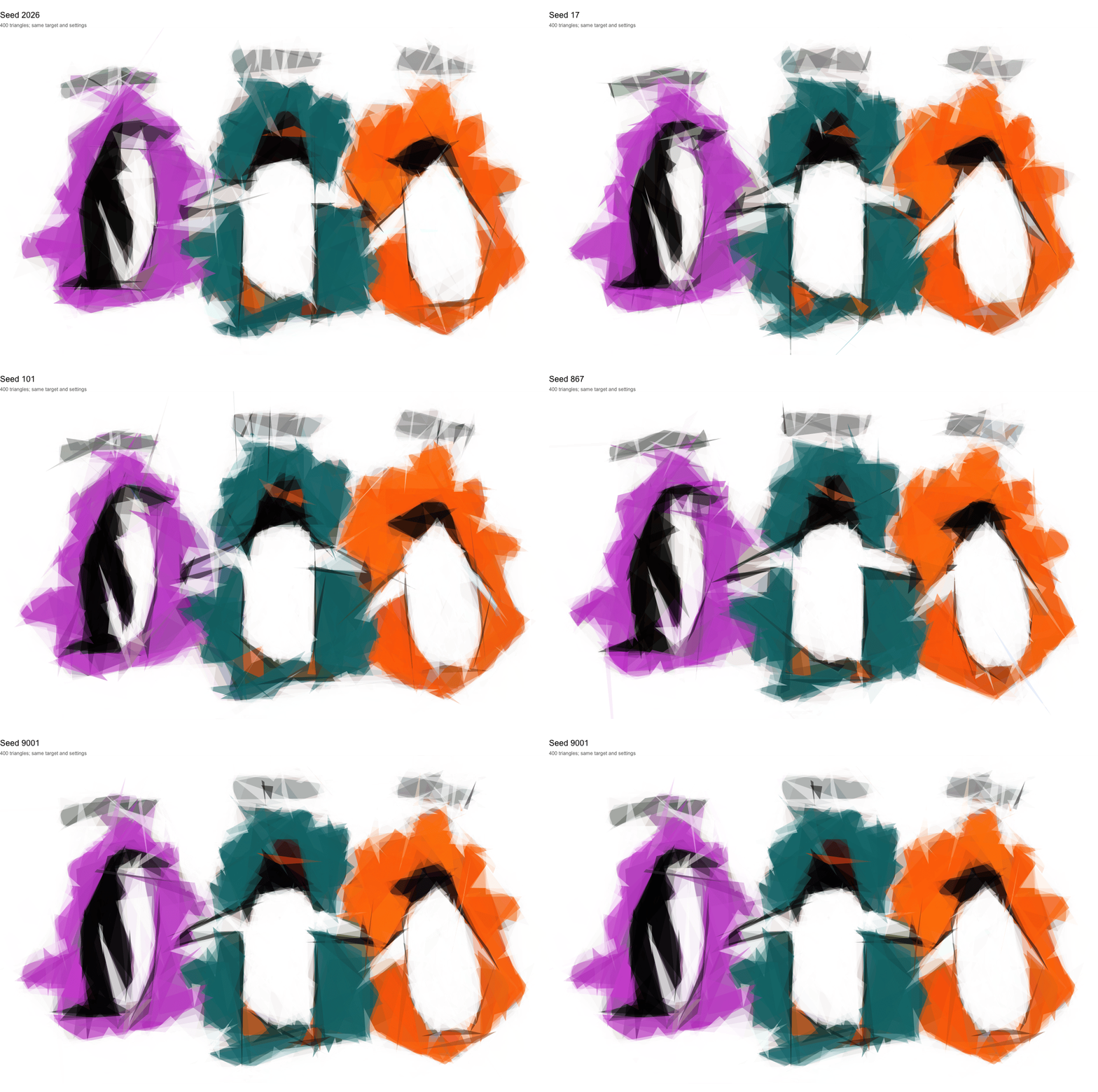
The composition never changes: the large color fields and silhouettes are where most of the error lives, and every run finds them. The differences live at the margins, in which slivers overshoot an edge and how each head gets roughed in. Each run is reproducible on its own, but there is no single “correct” set of triangles.
The script builds this animation only on request, because it repeats the search five more times:
Sys.setenv(PRIMITIVE_SEED_GIF = "true")
source("primitive_penguins.R")
The seed-2026 frame reuses the first 400 triangles of the main run instead of recomputing them. The seeds and shape count are set by variation_seeds and variation_n_shapes near the top of the script.
Run the experiment
The complete script downloads the source artwork when needed, runs the search, saves the final and progress images, writes the polygon data to CSV, and renders the GIF.
Download the complete R script
Install the packages once, place the script in an empty project folder, and source it from that folder:
install.packages(c(
  "tidyverse",
  "png",
  "progress",
  "gganimate",
  "gifski"
))

source("primitive_penguins.R")
The output will be written to an output/ directory. Change shape_type to "ellipse", "rectangle", or "mixed" to change the visual language. For a faster test, use the smoke-test values listed near the top of the script. Changing main_seed will produce another version of the same picture, as the seed animation above shows.
The eyes remain rough, but the answer to my weekend question was yes: R and ggplot2 can rebuild the picture, one triangle at a time.
The Palmer penguins artwork comes from the palmerpenguins project, which asks that uses of the artwork be credited “Artwork by @allison_horst.” The reconstruction method was inspired by Michael Fogleman’s open-source Primitive.